
Home Assistant for Total Beginners: What is it and How Does it Work?
Do you feel confused by all the smart home gadgets and apps? Home Assistant is a free tool that brings your devices together into one dashboard. This blog will guide total beginners through setup, integration, and automation in simple, step-by-step instructions.
Start making your home smarter today.
Key Takeaways
- Home Assistant is a free, open-source smart home platform. It allows users to control devices from multiple brands through a single dashboard.
- The system supports easy installation on various platforms, including Raspberry Pi, Windows, and Linux. Users can set it up in about 20 minutes.
- Integration covers lights, thermostats, cameras, and more. You can make custom automations, such as turning off all lights when you leave your home or setting the heating to match the time of day.
- Privacy is a core focus; Home Assistant stores your data locally, rather than using cloud services. This improves both privacy and security for users’ information.
- Support comes from a large community that frequently adds new features and provides assistance through forums and guides tailored for beginners.
What is Home Assistant?
Home Assistant is an open-source platform for smart home automation. It allows users to manage a wide range of smart devices from different brands through a single interface. Users can create custom automations and scenes to enhance their daily routines and workflows.
The system supports various protocols, ensuring compatibility with many Internet of Things (IoT) devices.
This powerful home control system emphasises privacy and security, giving users full control over their data. Home Assistant also has a vibrant community that contributes to its ongoing development.
The user-friendly interface simplifies the process of setting up new devices and creating unique experiences in your home. Next, we will delve into the Home Assistant system in detail.
How Does Home Assistant Work?
Home Assistant acts as a central hub for managing your smart home devices. You can install it on various systems, like Raspberry Pi or dedicated servers. This flexibility makes it accessible to many users eager to enhance their home control systems.
After installation, the onboarding process guides you through linking multiple devices easily.
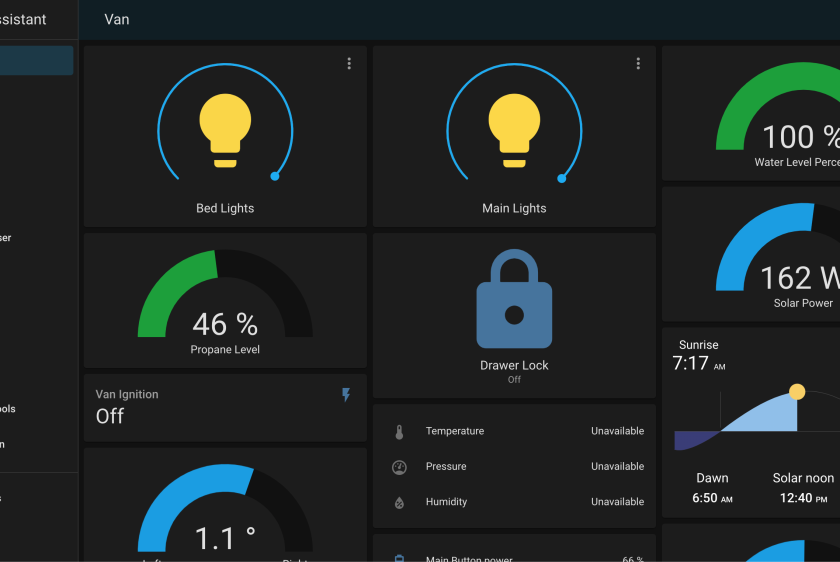
Device integration supports numerous brands, allowing seamless communication between them. Users can create automations and scenes without much hassle. The user interface lets you customise the dashboard according to your preferences.
Home Assistant even supports voice control for added convenience in smart home automation, making interactions smoother and more intuitive.
The Home Assistant System
The Home Assistant system enables users to manage their smart home devices in one centralised location. Installation is straightforward and can be done on various platforms, including Raspberry Pi, Windows, and Linux.
Once installed, users integrate compatible devices through the user interface. This integration enables communication between different brands and types of smart home technology.
Creating automations and scenes adds another layer of control. Users can set specific triggers for actions, such as turning off lights or adjusting thermostats, based on time or occupancy.
With Home Assistant’s custom dashboard options, personalisation becomes easy. The flexibility of this system supports energy management strategies while improving home privacy through local data processing.
Installation
Installing Home Assistant is straightforward. Start by selecting your preferred installation method. You can choose a Raspberry Pi, a virtual machine, or even run it on Docker. Many users like the Raspberry Pi for its simplicity and low cost.
Once you have your device ready, download the Home Assistant image from their official website. Flash this image onto an SD card using software like Balena Etcher. Insert the card into your Raspberry Pi and power it on. Wait for approximately 20 minutes while it sets up.
When it’s ready, access its user interface through a web browser using your device’s IP address. This marks the first step in creating your smart home automation system, where device integration becomes seamless and efficient.
Integration with Smart Home Devices
Home Assistant connects easily with various smart home devices. Users can integrate lights, thermostats, cameras, and more into a single system. This compatibility enables seamless control of multiple devices from a single platform.
Many brands support Home Assistant, making it accessible for most households.
Setting up device integration is straightforward. Users add their smart devices through the user interface. After connecting, they can create custom automations to enhance their daily routines.
For example, an automation could turn off all the lights when leaving home or set the temperature based on the time of day. This flexibility enhances energy management and overall convenience in home control systems, such as Home Assistant.
Creating Automations and Scenes
After setting up integrations with various smart home devices, you can create automations and scenes to enhance your home control system. Automations allow different devices to work together based on specific triggers.
For example, you can programme the lights to turn off when everyone leaves the house.
Scenes help set moods or activities by using multiple devices simultaneously. For instance, a “Movie Night” scene might dim the lights and close the curtains while turning on your TV device.
You customise these features through an intuitive user interface in Home Assistant. Enjoy greater flexibility as you manage energy consumption and improve convenience with ease.
Benefits and Advantages of Using Home Assistant
Creating automations and scenes offers numerous benefits of using Home Assistant. Users enjoy centralised control over their smart home devices. This system enables seamless device integration, allowing for easy management of everything from a single dashboard.
Flexibility stands out as another advantage. Home Assistant supports various IoT device compatibility, allowing users to connect numerous gadgets regardless of brand. Community-driven development ensures continuous improvements in user interface features and automation scripting capabilities.
With a strong emphasis on privacy and security, people can confidently manage their energy consumption without compromising their home privacy.
Centralised Control and Management
Home Assistant offers centralised control for your smart home devices. This feature allows users to manage all their gadgets from a single interface. You can connect various devices, such as lights, thermostats, and cameras, through the Home Assistant platform.
The integration is simple and effective.
With this system setup, you gain full oversight of your home automation. Users can create custom dashboards to view and control device status at a glance. Energy management becomes easier as well; you can monitor consumption directly from the user interface.
Enjoy the benefits of private home operations while keeping everything secure in one place.
Flexibility and Community-Driven Development
Flexibility defines Home Assistant. Users can customise the system to suit their specific needs. This adaptability allows for various smart home automation setups. Community-driven development adds richness to this platform.
Many developers contribute custom components and enhancements, making integration with smart home devices easier.
Users benefit from an ever-expanding library of automation scripting options. The active community shares knowledge through forums and guides, helping beginners on their journey. Personalisation features enable dashboard customisation as per individual preferences.
Thus, users create a tailored interface that truly reflects their lifestyle while managing energy efficiently and maintaining home privacy seamlessly.
Privacy and Security.
Home Assistant prioritises your privacy and security. It allows you to manage smart home automation without relying on cloud services that might compromise your data. This open-source platform gives users full control over their information.
You can set up a home control system that keeps your IoT devices secure.
Strong encryption protects communication between devices. Home Assistant also offers local storage options, reducing the risk of external breaches. Customisable user interfaces help ensure only authorised individuals access sensitive features.
By focusing on these aspects, Home Assistant enhances home privacy while empowering users to create personalised experiences in their automated environments.


