
Home Assistant Explained: A Beginner’s Guide to Smart Home Automation
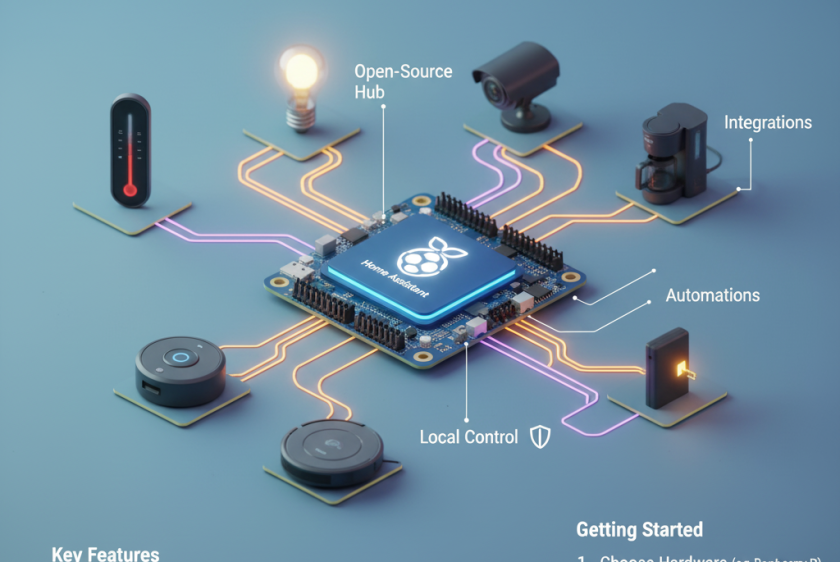
Many people struggle to connect all their smart home devices in one place. Home Assistant is a free and open-source platform that helps you manage your smart home automation from a single dashboard.
This guide will explain how Home Assistant makes device integration, energy monitoring, and privacy solutions easy for beginners. Read on to start your journey with smart technology at home.
Key Takeaways
- Home Assistant is a free, open-source platform that enables users to manage smart devices from a single, intuitive dashboard. It works with popular wireless protocols like Zigbee, Z-Wave, and Wi-Fi.
- The community drives the development of Home Assistant. Users and developers can access the code, suggest features, and report issues to improve functionality.
- Privacy is a key focus. Home Assistant allows users to control devices locally, with minimal reliance on cloud services. This approach keeps personal data safe within your home network.
- You can install Home Assistant on various devices such as Raspberry Pi, NAS systems, or dedicated hardware. Each option allows easy setup for beginners.
- The platform makes it easy to create automations for tasks such as turning lights on at sunset or tracking energy usage. Its interface will enable you to organise devices by room and monitor all activity from one place.
What is Home Assistant?
Home Assistant is an open-source platform for managing smart devices. It focuses on local control and privacy, allowing users to easily automate their homes.
Community-driven, open-source project
Home Assistant operates as a community-driven, open-source project. This means that users and developers contribute to its growth and improvement. Anyone can access the code, suggest features or report issues.
Such involvement fosters innovation and creativity within the smart home automation space.
Privacy remains a key focus for Home Assistant. Local control of data empowers users to manage their smart devices without relying on cloud services. This approach enhances security while promoting user autonomy in device management and integration across various systems.
Next, we will explore how to get started with Home Assistant.
Prioritises local control and privacy
Home Assistant focuses on local control and privacy. Users manage their smart home devices without relying heavily on cloud services. This approach ensures that personal data stays within the home network.
It protects sensitive information from potential breaches common in remote servers. Home Assistant supports various wireless protocols, allowing seamless integration of multiple devices.
Privacy solutions are essential for many users today. People want peace of mind when using automation systems. By prioritising local management, Home Assistant empowers users to take charge of their environments while ensuring safety and confidentiality.
The user interface simplifies device management, allowing users to easily monitor activity without compromising security or control over individual automations.
Supports various wireless protocols
Home Assistant supports many wireless protocols. This feature enables seamless connectivity between various smart devices. Users can easily integrate lighting, heating, and security systems.
The platform is compatible with popular protocols such as Zigbee, Z-Wave, and Wi-Fi. Each protocol has its strengths. For example, Zigbee consumes less power while providing fast communication between devices.
With this broad support for wireless integration, Home Assistant simplifies device management. You can create a custom user interface tailored to your needs. Dashboards display energy monitoring data clearly as well.
This flexibility enhances home automation experiences and promotes better privacy solutions for users seeking control over their smart homes.
Provides a single dashboard and interface
Home Assistant provides a single dashboard that displays all your smart devices in one convenient location. This interface simplifies home automation. You can monitor and control everything from lights to security cameras efficiently.
With just a few taps, you create automations that make daily life easier.
The user interface is intuitive and customisable. It allows you to organise devices by rooms or types for quick access. Energy monitoring features help you track usage, promoting energy efficiency in your home automation systems.
Enjoy privacy solutions while managing your connected devices seamlessly from this unified platform.
How to Get Started
To get started, select a device for installation, such as a Raspberry Pi or NAS. Next, follow the setup instructions to install Home Assistant. Once installed, you can create automations to improve your smart home experience.
Explore more options to make your home smarter!
Installation options (Raspberry Pi, NAS, dedicated devices)
Raspberry Pi offers an affordable way to install Home Assistant. It suits beginners who want a small, efficient device for home automation. Users easily set up the software on the Raspberry Pi’s operating system.
Network-Attached Storage (NAS) serves as another option for installation. This choice provides more storage and flexibility for managing devices. Dedicated devices also work well; they come pre-installed with Home Assistant, simplifying the setup process.
Each of these options enables you to create custom automations and manage your smart home effectively, ensuring that privacy solutions remain in place while utilising energy monitoring features.
Setting up Home Assistant
Setting up Home Assistant is straightforward. You can choose from various installation options, including a Raspberry Pi, NAS, or dedicated devices. Each option has its benefits and can suit different user needs.
After selecting your device, download the software from the official site. Follow the easy setup instructions provided there. Once installed, you configure your user interface and set up dashboards to view all connected smart home devices.
Create automations to manage tasks efficiently and enjoy seamless home automation with privacy solutions in place.
Creating automations
Creating automations in Home Assistant streamlines your smart home experience. You can easily set triggers based on time, events, or sensor states. For instance, you might want your lights to turn on at sunset or the thermostat to adjust when everyone leaves.
Use clear and simple scripts to define these actions.
Home Assistant offers a user-friendly interface for building automation scripts. This allows you to manage multiple devices seamlessly. Integrate various components, such as motion sensors and smart speakers, for enhanced control over your environment.
With effective energy monitoring features, you can also automate tasks that save energy and improve security with ease.


